The Project
For our first major game design project at school, we were given the basics to a game called SCRAPS and asked to create our own level for it. We were given the backstory, basic game systems, the character, UI, etc and asked to create 1-2 mechanics and introduce them over the course of our level.
While we were on teams, we did not work directly together. Our levels were planned & positioned to be loaded simultaneously to create the “full” game and our jobs were to create our own level plus the transitional area that led into the next level. While we shared materials and other assets, each member was solely responsible for only their own level.
The Tasks
- Design & Implement mechanics that fit thematically into an existing game’s framework
- Design and build a level from graybox through to the final design
- Import and place various art assets and set decoration as well as create many objects myself. Most objects in game were created by myself using unity tools ex: crates, doors, desks, chairs, shelves, fans.
- Write any code required for mechanics/features ex: breaking items with the axe, activating objects via lever, toggling lights
The Process
My two mechanics were to find a key, in this case a Fire Axe to break an object, or find a lever to progress through a level. I had originally hoped to have some more creative or complex mechanics but instead opted to focus more on the overall flow of the level. It was really important to me that player’s wouldn’t get lost in a level and so I focused on how I would guide them from start to finish.
I used a variety of principles to try to make sure the player knew where to go and what to do, the first was light. In some cases simple Red/Green lights to indicate something was off when it should be on and placing lights above/shining onto key locations to draw the player’s attention to certain areas; above doors, next to objectives, or anything else I wanted to direct the player’s attention to.
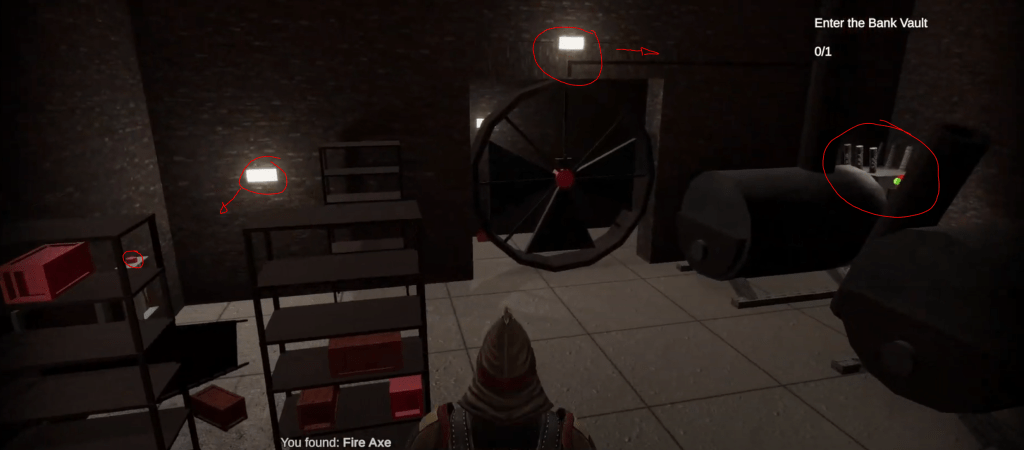
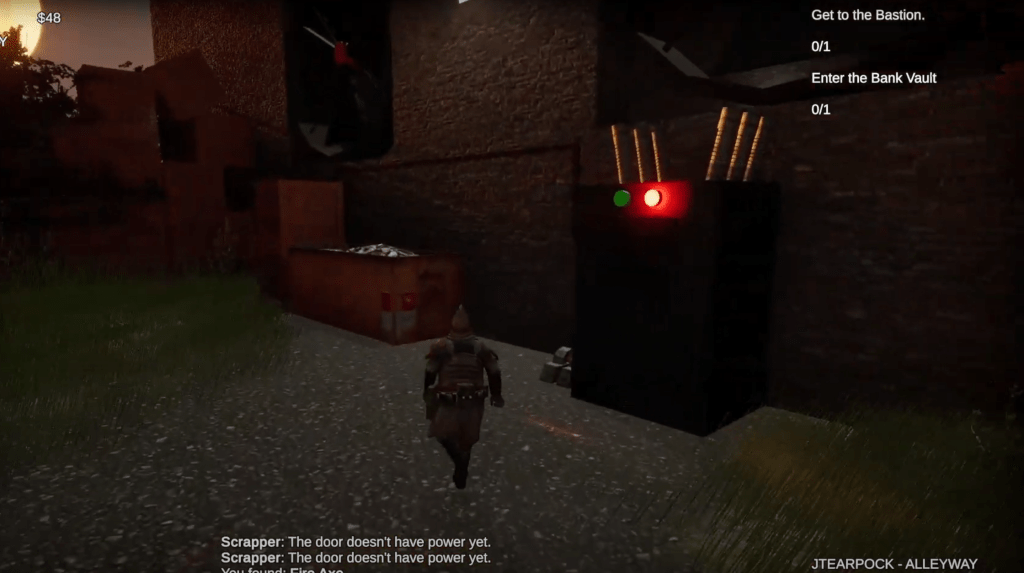
I also tried to use a color/texture that stood out among the rest, in my case a bright red that indicated something was interactable. I think it might have been too obvious at times but I wanted it to be consistent so the red of the Fire Axe & Axe Case is the same red as the the levers or the centers of movable fans as well as interactable loot crates.
Lastly I tried to follow the principle of leading lines to direct the player. I used this mostly in two areas, the first being wires that went directly from a fan the player needed to pass through to the lever that turned the fan on. The second was in the decoration of the level, particularly with foliage and textures. I tried to make sure there were clear paths for the player to follow while other areas were overgrown and cluttered.
The Conclusion
Overall I’m pleased with the result of the project. It’s far from perfect and could greatly be improved upon but for my first ever level design project I’m proud of what I accomplished.
I don’t consider myself an artist so I tried to focus on the overall level design and guiding principles because I felt they were what was most important to creating a successful level. I know I still have a lot to learn but I think that I demonstrated a solid understanding of the basics of level design and I’m looking forward to learning more.
 Tearpock's Portfolio